Everything the moon, nothing you don't need
Widget-first, astronomy-accurate, and private by design. Here is what is inside.
Tonight, at a glance
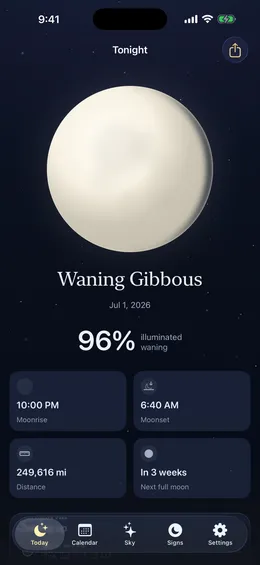
Open Gibbous for the phase, the illuminated percent, moonrise and moonset for your location, and a countdown to the next full and new moon. It all works offline.
The lunar calendar
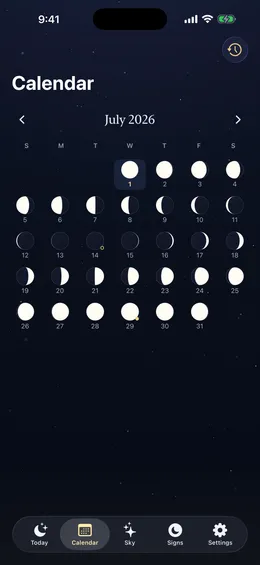
A whole month of phases in one view, each drawn as a small moon. New and full moons are marked; tap any day for its moon, distance, and sign.
A planner for photographers
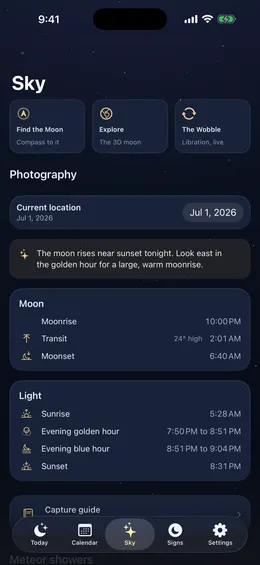
Moonrise, moonset, and transit height alongside the sun's golden and blue hours, for any place you save, with a read on the best nights to shoot the moon.
The moon through the signs
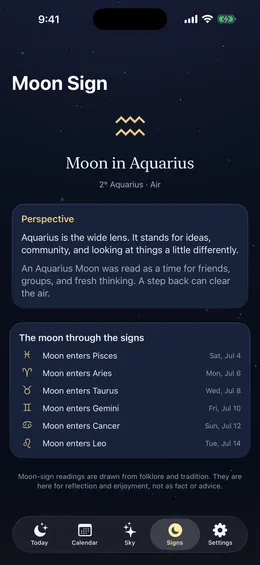
An optional layer for the astrology-curious: the moon's current sign, what it traditionally means, and when it next changes. Framed as folklore, never forced.
Widgets
Home and Lock Screen widgets in several styles, on iPhone and iPad, plus Apple Watch complications and a one-tap Control Center button.
Siri and Shortcuts
Ask Siri for tonight's moon, the moon on any date, or the next full moon. Answers instantly, even offline.
Alerts
A quiet heads-up before every full moon, free. Premium adds new moons, quarters, eclipses, supermoons, rare moons and the peak night of every major meteor shower, a digest of the weeks ahead, half an hour's notice before an evening moonrise, and an alert each time the moon returns to the phase you were born under.
Add to Calendar
Any full moon, new moon, eclipse, perigee or meteor shower goes into your own calendar with one tap, free. Gibbous never asks for calendar access; the system editor does the writing.
Moon days
The festivals and observances the moon sets, a year ahead, from each tradition's own calendar: Lunar New Year and Mid-Autumn, Ramadan and the Eids, Passover and Rosh Hashanah, Easter, Vesak, and the full and new moon days of the Hindu and Buddhist months. Free for what is next; Premium for the whole year.
Live Activity
Tonight's moon on the Lock Screen and in the Dynamic Island.
Your birth moon
Tell Gibbous your birthday and it shows the moon of that night, free. Premium tells you each time the moon comes back to that phase, about once a month, and keeps your birth moon in a widget of its own.
Moon journal
A private note under any night's moon, kept on your device. What did you do under the Wolf Moon?
3D moon globe
Tap the moon to spin the whole globe, tilted by tonight's true libration, with the maria and craters where they really are. A separate view shows that wobble on its own.
Moon compass and camera finder
A live dial that points at the moon: turn until the marker meets the top, then look up. Works in daylight, and tells you when the moon returns if it is below the horizon. Premium adds the camera finder: point your iPhone at the sky and a marker leads you to the moon.
Capture guide
Free camera settings for the moon: exposure starting points, a calculator for how large the moon lands in your frame at any focal length, and a pocket checklist. Free users also get a look at the next good night to shoot.
Meteor showers
The year's major showers with peak nights and rates, and a read on how much moonlight will wash out each one.
Eclipses and supermoons
What is coming in the sky, each explained plainly, with a visibility map and timings for where you are. On an eclipse night the Live Activity counts down to it, and a Premium widget keeps the next eclipse on your Home Screen with whether your sky sees it.
An icon that follows the moon
Optional: the app icon itself updates to the current phase each time you open Gibbous.
Made for iPad
On iPad the calendar opens the tapped day beside the month, the moon sign page draws the moon on a zodiac wheel with a full lap of sign changes, and the 3D globe fills the screen. Every orientation, Split View and Slide Over included.
In your language
English, Spanish, French, German, Portuguese, and Japanese, on iPhone, iPad and Apple Watch.
Private by design
No account, no ads, no tracking. Your data stays on your device and your iCloud, and you can export all of it to a file, or delete all of it, from Settings.
Offline
Everything is computed on your device, so it works with no signal.